Contents
- Key Takeaways: What is the Best Etsy Listing Photo Size?
- Etsy Image Size Cheat Sheet
- Etsy Product Image Size Best Practices for Better Conversion
- Etsy Banner Sizes Best Practices
- Etsy Profile Picture Size
- Etsy Product Photography Tips
- How to Edit Your Etsy Photo Tools & Workflow
- Etsy Photo Compliance & Legal Best Practices
- Common Etsy Photo Mistakes
- FAQs
Key Takeaways: What is the Best Etsy Listing Photo Size?
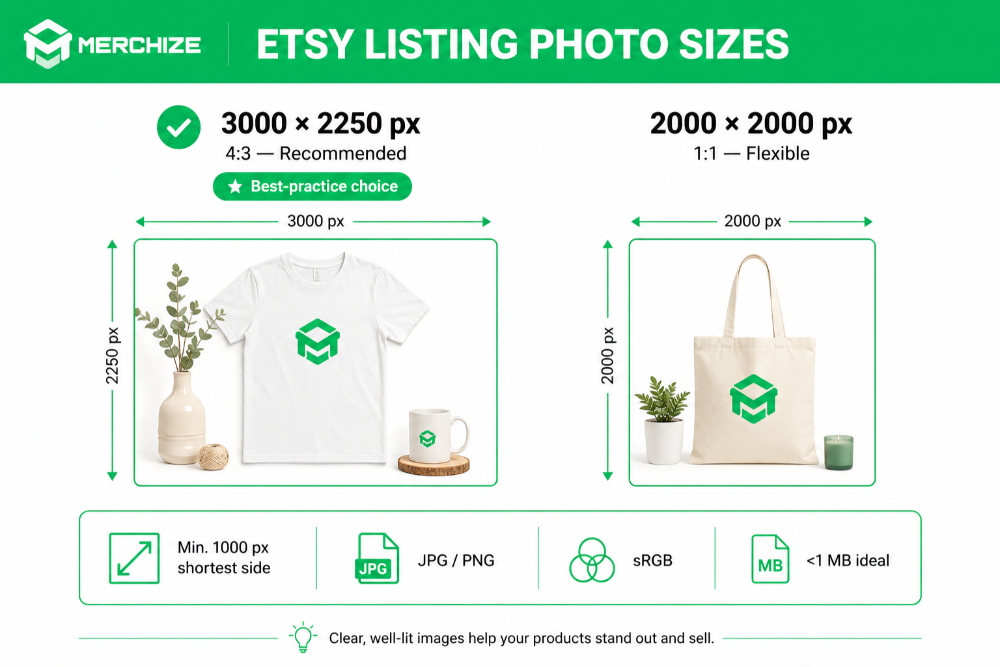
Etsy recommends that listing photos should be at least 2000 px on the shortest side, with 3000 × 2250 px (4:3) or 2000 × 2000 px (1:1) as recommended sizes. Use JPG in sRGB color mode, ideally under 1 MB. The minimum accepted width is 1000 px.
- Recommended size: 3000 × 2250 px (4:3)
- Alternative size: 2000 × 2000 px (1:1)
- Minimum dimension: 1000 px wide on the shortest side for the recommended-quality experience
- Format: JPG or PNG
- Color mode: sRGB
- Ideal file size: under 1 MB
Etsy Image Size Cheat Sheet
| Asset | Recommended | Minimum | Max File Size | Ratio | Format |
| Listing photo | 3000 × 2250 px | 2000 px shortest side | 10 MB (1 MB ideal) | 4:3 / 1:1 | JPG / PNG |
| Listing thumbnail | 570 × 456 px | — | — | 5:4 | JPG |
| Hero / zoom photo | 3000 × 3000 px | 2000 px | 1 MB | 1:1 | JPG |
| Big shop banner | 1600 × 400 px | 1200 × 300 px | — | 4:1 | JPG / PNG |
| Mini shop banner | 1600 × 213 px | 1200 × 160 px | — | ~7.5:1 | JPG / PNG |
| Order receipt banner | 1600 × 400 px | 760 × 100 px | — | 4:1 | JPG / PNG |
| Carousel banner (Etsy Plus) | 1200 × 300 px/slide | — | — | 4:1 | JPG / PNG |
| Collage banner | 600 / 400 / 300 × 300 px | — | — | Varies | JPG / PNG |
| Profile picture | 500 × 500 px | 400 × 400 px | — | 1:1 | JPG / PNG |
| Shop icon | 500 × 500 px | — | — | 1:1 | JPG / PNG |
| Team logo | 170 × 100 px | — | — | 1.7:1 | JPG / PNG |
| Listing video | ≥1080 px | 720 px | 100 MB | 2:1 / 1:2 | MP4 / MOV / FLV |
Etsy Product Image Size Best Practices for Better Conversion
Besides choosing the right Etsy photos, a few other factors of your listing photos can also affect your listing’s conversion. Etsy shows your photos differently depending on where a buyer sees them, so a few smart choices around cropping, sizing, spacing, and photo count can make a real difference in how your listings perform. Here are the key practices to keep in mind.
Understand How Etsy Crop/Resize Images
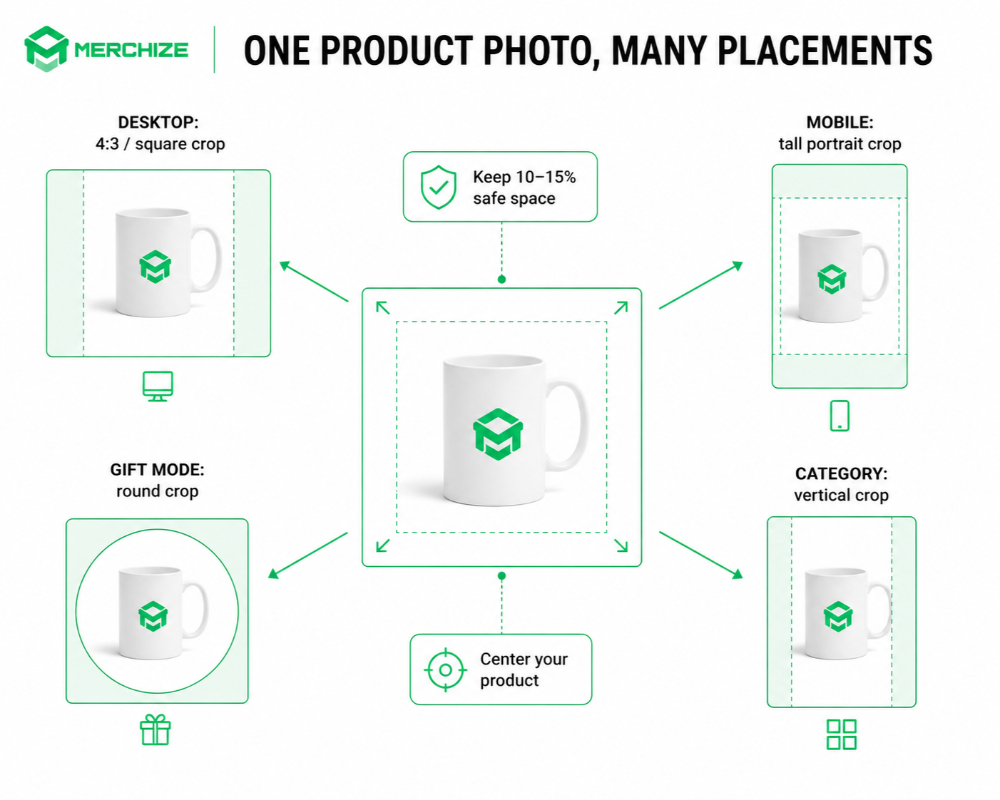
Etsy doesn’t show your photos the same way everywhere. Desktop search results, the mobile app, and Gift Mode all crop your images differently.
- Desktop search grid: square or 4:3 crop
- Mobile app: tall, close to 4:5 portrait
- Gift Mode: round crop
- Category pages: vertical crop
- “You might like" carousels: small square crop
Because of this, there’s no single crop that looks perfect everywhere. That’s exactly why sizing and composition choices (coming up next) matter so much.
Picking the Right Size and Aspect Ratio
Etsy’s recommended minimum is 2000px in both width and height. Below that, your photos lose the ability to zoom, which is one of the biggest things shoppers rely on to judge a product before buying.
For the best-quality result, aim higher than the minimum:
- 3000 × 2250px (4:3) — Etsy’s recommended format, great for landscape-style product shots
- 2000 × 2000px (1:1) — more forgiving across Etsy’s different crops (square, vertical, round)
If you’re not sure which to pick: 4:3 is the “official" safe choice, but square is the more flexible one since it survives Etsy’s various crops with less loss.
For a less conventional option, consider the 2700 × 2025 px size (3:4). This dimension is useful for very tall products such as lamps and dresses. However, it has higher risk of aggressive cropping in some grids.
Don’t go overboard on resolution, though. Etsy compresses everything you upload, so a massive 8000px image just slows down your upload without improving how it looks on the site. Keep files under 1MB where possible — anything much larger can fail to upload, especially on a slow connection.
Leave Safe Space Around Your Product
Etsy crops your photos differently depending on where they show up, so it’s smart to build in a buffer. A simple guideline: leave 10–15% empty space around every edge of the photo.
This protects your product from:
- Automatic thumbnail cropping
- Search card overlays
- Round Gift Mode crops
- Mobile zooming
A couple of extra tips here:
- Keep your product centered, with even margins on all sides, so nothing gets clipped by accident.
- Aim for your product to fill roughly 60–70% of the frame — not so small it looks lost, not so big it gets cropped.
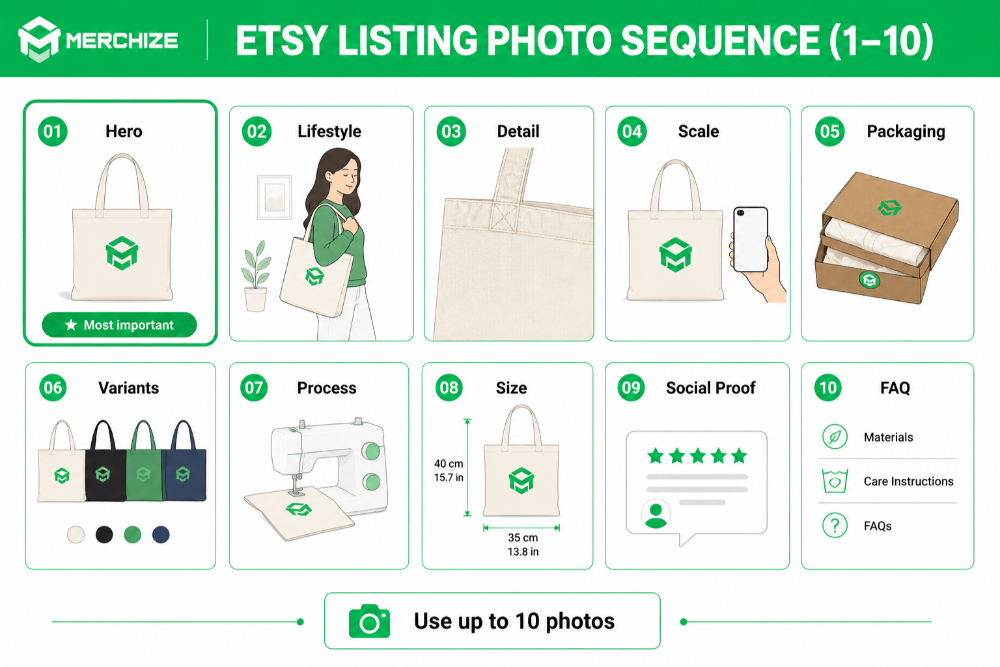
How Many Photos to Upload (and in What Order)
You can upload up to 10 photos per listing, and it’s worth using most of that space. Buyers can’t touch or inspect your product in person, so photos are doing all the convincing.
A solid order to follow:
- Hero shot — clean, centered, no clutter
- Lifestyle shot — the product in use
- Detail shot — texture, stitching, materials
- Scale reference — next to a hand or familiar object
- Packaging shot — boosts perceived value
- Customization options — colors, sizes, variants
- Process shot — shows off your craftsmanship
- Size chart or measurements
- Social proof or testimonials
- FAQ visual — care instructions, materials, etc.
Your first photo matters most — it’s what shows up in search results, so it needs to work hardest. Keep it clear, high-contrast, and simple. It should also be horizontal or square, since Etsy uses your first photo’s shape to decide how the rest of your photos get cropped in thumbnails — matching shapes across all your photos keeps the browsing experience consistent.
Test and Refresh Your Photos Over Time
Your photos aren’t a “set it and forget it" job. Etsy gives you the tools to keep improving them.
- A/B test your hero image — swap it out, then track impressions and clicks in Etsy analytics to see what performs better.
- Refresh your photos every 6–12 months, or seasonally if that fits your product. Trends and buyer expectations shift, and your photos should keep up.
- Keep your old images instead of deleting them — if a refresh doesn’t perform as well, you can switch back.
Etsy Banner Sizes Best Practices
Banners help set the tone for your shop when buyers first visit your store. Etsy offers several banner types, each with its own size, placement, and purpose. Here’s what you need to know to get each one right.
Big Shop Banner
This is the main banner at the top of your shop, so it’s worth getting right. Etsy’s recommended size is 1600 × 400px, with 1200 × 300px as the minimum — both work out to a 4:1 ratio.
A couple of quick tips:
- Keep logos and important text inside the center of the banner, away from the edges, since those areas are more likely to get cropped on different screens.
- Aim for under 1MB, so it loads quickly.
Mini Shop Banner
The mini banner is a smaller, secondary option — recommended size is 1600 × 213px, with a minimum of 1200 × 160px (roughly a 7.5:1 ratio).
One thing worth knowing: the mini banner doesn’t show up on mobile. If most of your shop traffic comes from phones, it’s worth prioritizing your big banner instead.
Order Receipt Banner
This banner shows up on the order receipt, so it’s a good spot for things buyers see after they’ve already purchased. Recommended size is 1600 × 400px, with a minimum of 760 × 100px.
Good uses for this space:
- Coupon codes for repeat customers
- Social media handles
- A simple thank-you message
- Cross-promotion for other products
Carousel Banner (Etsy Plus)
If you’re subscribed to Etsy Plus, you get access to a rotating carousel banner made up of four slides, each sized 1200 × 300px.
This is a good spot to rotate through:
- Bestsellers
- New arrivals
- Your brand story
Collage Banner
Also an Etsy Plus feature, the collage banner lets you combine multiple photos into one banner. The size you need depends on how many images you’re using:
- 2 images: 600 × 300px each
- 3 images: 400 × 300px each
- 4 images: 300 × 300px each
Since these images sit side by side, try to keep lighting, color tone, and alignment consistent across all of them — otherwise the banner can look mismatched.
Common Etsy Banner Mistakes To Avoid
A few small mistakes come up again and again with banners:
- Tiny text that’s readable on desktop but disappears on mobile screens
- Logos placed too close to the edges, where they’re more likely to get cropped
- Oversized files that slow down load times
- Unlicensed stock photos, which can lead to copyright issues down the line
Etsy Profile Picture Size
Your profile picture is a small image, but it shows up in a lot of places — reviews, community posts, and messages — so it’s worth getting the size right.
Etsy’s official recommendation is 400 × 400px, in a 1:1 ratio. Other sources suggest sizing up slightly to 500 × 500px with 400 × 400px as the minimum, which gives you a bit more room if Etsy ever displays it larger. Either way, stick to JPG or PNG, in sRGB color mode, and keep the file under 1MB.
Profile Picture vs. Shop Icon
These two often get mixed up, but they represent different things:
- Profile picture — represents you, the account owner. It shows up in community areas and reviews.
- Shop icon — represents your brand. It shows up next to your shop name.
Since they serve different purposes, it’s fine for them to look different. That said, keeping them visually consistent — same colors, same style — helps reinforce your brand and makes your shop feel more put-together.
Designing for Small Displays
Your profile picture often shows up tiny, so it needs to hold up at a small size, not just look good full-size.
A few things that help:
- Use strong contrast so the image doesn’t get lost or look flat
- Avoid fine text or thin lines — they tend to disappear at small sizes
- Keep the design simple; a single clear subject reads better than something busy
- Before uploading, preview it at thumbnail size to make sure it still looks clear
Etsy Product Photography Tips
Great photos don’t happen by accident. Lighting, background, camera settings, focus, color, and styling all work together to make your product look its best. Here are some simple tips to help your photos convert more browsers into buyers.
Lighting
Good lighting is one of the biggest factors in how professional your photos look, and you don’t need expensive gear to get it right.
Some reliable options to shoot with:
- Natural daylight, ideally soft and indirect
- Continuous LED panels
- Light tents or light boxes
- Softboxes
On the flip side, a few lighting situations are worth avoiding, since they tend to create unflattering shadows or odd color casts:
- Mixed lighting (like daylight combined with indoor bulbs)
- Harsh overhead lighting
- Direct on-camera flash
Backgrounds
Your background sets the tone for the whole photo, so it’s worth choosing intentionally rather than just shooting wherever’s convenient.
A few solid options to consider:
- A pure white background for a clean, catalog-style look
- A lifestyle or contextual background that shows the product in use
- A gradient sweep for a soft, professional feel
- A colored or textured background to match your brand
- A DIY seamless white background if you’re shooting on a budget
Camera & Lens
You don’t need professional gear to get great Etsy photos — a modern smartphone can absolutely hold its own. That said, if you’re using a mirrorless camera or DSLR, a few lens choices tend to work especially well for product shots:
- 50mm prime for general product photography
- 60mm or 90mm macro for close-up detail shots, like jewelry or texture
- 24–70mm zoom for flexibility across different shot types
A tripod and remote shutter are also worth having on hand. They keep your shots sharp and consistent, especially in lower light.
Focus & Depth of Field
For most product photos, you want the whole item in sharp focus, not just part of it. That means favoring a deeper depth of field.
If you’re shooting on a DSLR or mirrorless camera, aim for an aperture around f/8 to f/11. For very small or detailed items, focus stacking (combining multiple shots at different focus points) can help keep everything crisp. Smartphone users can get a similar effect by locking focus and exposure before taking the shot.
Color Accuracy
Buyers rely heavily on photos to judge what a product actually looks like, so accurate color matters more than it might seem.
A few ways to keep colors true to life:
- Use a gray card while shooting to help calibrate colors afterward
- Calibrate your monitor so what you see while editing matches reality
- Consider a polarizing filter for reflective products, since it cuts down on glare and color distortion
Styling & Props
Props can help tell a story around your product, but they should support it, not compete with it.
A few things worth keeping in mind:
- Choose props that complement the product rather than distract from it
- Include a scale reference so buyers understand the actual size
- For handmade items, consider showing your tools, materials, or part of the making process — it adds authenticity and craftsmanship appeal
Photo Guidance by Product Niche
Different product categories call for different photo priorities. Here’s a quick reference:
| Niche | Photo Priorities | Watch Out For |
| Jewelry | Macro details, hand scale, packaging, gift-ready flat lay | Reflections, blur, inaccurate colors |
| Clothing | Models, flat lays, fabric close-ups, size charts | Wrinkles, inconsistent lighting |
| Home decor | In-room staging, scale references, complementary items | Product appearing too small |
| Digital downloads | Mockups, page previews, file-format visuals | Watermarks, low-res previews |
| Print-on-demand | Lifestyle mockups, color variants, scale, packaging | Trademarked imagery |
| Vintage | Multiple angles, flaws, wear details | Hiding defects |
| Handmade | Process, maker, materials | Looking amateur rather than artisanal |
| Wedding / paper | Styled flat lays, envelope/table mockups | Color inconsistencies |
How to Edit Your Etsy Photo Tools & Workflow
Once you’ve taken your photos, editing them properly makes a big difference in how professional they look. There are plenty of tools available, from free editors to AI-powered helpers, plus a simple workflow to keep everything consistent. Here’s how to put it all together.
Resize & Export Tools
You don’t need an expensive software subscription to get your photos edit-ready for Etsy — there are solid options at every budget.
- Free tools:
- Canva — great for beginners, with drag-and-drop templates
- GIMP — a free, full-featured alternative to Photoshop
- Darktable and RawTherapee — good for photo editing and RAW processing
- Squoosh — handy for quick image compression
- Pixlr — browser-based editing with a familiar Photoshop-like feel
- Paid tools:
- Adobe Lightroom and Photoshop
- Capture One
- Affinity Photo
- Mobile apps:
- Lightroom Mobile
- Snapseed
- VSCO
AI-Powered Tools
AI tools have made a lot of once-tedious editing tasks much faster, especially for background work and upscaling.
- Background removal: remove.bg, PhotoRoom, or Canva’s built-in background remover
- Upscaling: Topaz Gigapixel AI, Adobe Super Resolution, or Upscayl — useful if your source image is a bit smaller than you’d like
- Generative fill: Photoshop’s Generative Fill can extend or clean up a background
- One important caution: don’t use AI to misrepresent your products, materials, craftsmanship, or size. Buyers should get exactly what they see in your photos.
Recommended Batch Workflow
If you’re managing a shop with more than a handful of listings, having a repeatable workflow saves a lot of time. Here’s a simple process to follow:
- Shoot with consistent settings so your photos match across listings.
- Cull your shots and select the keepers.
- Batch edit using a saved preset, so every photo gets the same treatment.
- Batch export at 3000 × 2250px, sRGB, JPG quality 88.
- Upload through Etsy’s listing tools.
- Setting this up once means every future listing takes a fraction of the time.
Etsy Photo Compliance & Legal Best Practices
Before you upload your photos, it’s worth understanding a few rules around copyright, privacy, and disclosure. Following these guidelines keeps your shop compliant and protects you from issues down the line.
Image Copyright
Only use photos you actually own, have licensed, or have explicit permission to use. This applies to your own product shots as well as any stock photos or graphics you bring in.
If you’re using stock photography, always read the license terms carefully — some licenses restrict commercial use or require attribution. Copyright infringement isn’t just a minor issue either; it can lead to listing removal or penalties on your shop.
Model Releases & Privacy
If a recognizable person appears in your photos, you’ll need their permission to use the image commercially. This is especially important for lifestyle shots featuring models or customers.
It’s also worth double-checking your backgrounds. Avoid accidentally exposing private information, like a home address, mail, or ID documents, in the shot.
Trademarks in Photos
Try to avoid showing visible third-party logos or trademarks in your photos, especially in lifestyle shots where other branded items might end up in the background.
If a branded product does show up in the frame, consider blurring it or replacing it with something unbranded before you upload.
AI-Generated Images
If you use AI-generated images in your listings, disclose that clearly where Etsy requires it. Shoppers should always know what they’re looking at.
As with editing tools in general, don’t use AI-generated images to misrepresent a product you don’t actually make or sell yourself.
Accessibility
Making your listings accessible is good practice and helps a wider range of buyers understand your product.
A couple of easy wins here:
- Add descriptive alt text to every photo, explaining what’s in the image.
- Use descriptive filenames instead of generic ones — something like ceramic-vase-blue-glaze-hero.jpg instead of IMG_2034.jpg.
Common Etsy Photo Mistakes
| Problem | Likely Cause | Fix |
| Upload rejected | File too small / wrong format / animated GIF | Verify minimum dimensions and format |
| Zoom doesn’t work | Image under 2000 px | Re-export at 3000 px shortest side |
| Photo looks dull/yellow | CMYK | Convert to sRGB |
| Photo looks blurry | Compression / soft source | Use higher-quality JPG + sharpening |
| PNG has black background | Transparency issue | Add background / use JPG |
| Cropping differs by device | Wrong aspect ratio | Use 1:1 or add padding |
| Product looks tiny | Too much empty space | Aim for subject at 60–70% of frame |
FAQs
What is the best Etsy listing photo size?
3000 × 2250px (4:3) is the best-practice recommendation, with 2000 × 2000px (1:1) as a flexible alternative.
Is 2000 × 2000 or 3000 × 2250 better for Etsy?
3000 × 2250 is Etsy’s recommended format for landscape shots, but 2000 × 2000 crops more reliably across Etsy’s different placements. Neither is “wrong" — it depends on your product.
What is the minimum Etsy image size?
2000px on the width and height, per Etsy’s official guidelines. Below that, zoom gets disabled.
What aspect ratio is best for Etsy listing photos?
Square (1:1) is the safest all-purpose ratio since it holds up best across Etsy’s various crops. 4:3 works well too, especially for a consistent landscape-style shop.
Does Etsy compress listing photos?
Yes. Etsy compresses all uploaded images to optimize load speed and mobile display.
Should Etsy photos be JPG or PNG?
JPG is recommended. PNG works too, but transparent PNGs will show a black background on Etsy.
What color mode should Etsy photos use?
sRGB. CMYK is meant for print and will cause colors to look off on Etsy.
What size should an Etsy shop banner be?
1600 × 400px is recommended, with 1200 × 300px as the minimum.
What size should an Etsy profile picture be?
400 × 400px is Etsy’s official recommendation, though 500 × 500px is sometimes suggested for extra flexibility.
Can I use AI-generated images on Etsy?
Yes, but you must disclose AI-generated content where Etsy requires it, and you can’t use it to misrepresent your product.