
Contents
If you’ve ever looked at your sticker designs and thought, “These could be earning more than just likes,” then this article is for you. Amazon isn’t just a massive marketplace, it’s an ecosystem where small ideas, like a unique sticker design, can grow into a sustainable source of revenue. With the right strategy in niche selection, pricing, branding, and SEO, sellers can turn their sticker collections into a profitable long-term product line.
In the following sections, we’ll help you better understand how to sell stickers on Amazon effectively and in a way that supports real growth for your business.
Is selling stickers on Amazon profitable?
Of course, selling stickers on Amazon is highly profitable, especially for those who choose the right niche and manage costs effectively. Stickers remain in strong demand across many audiences, from students and hobbyists to small business owners and gift buyers. People use them to decorate laptops, notebooks, water bottles, cars, packaging, and personal items, making stickers a consistently purchased product.
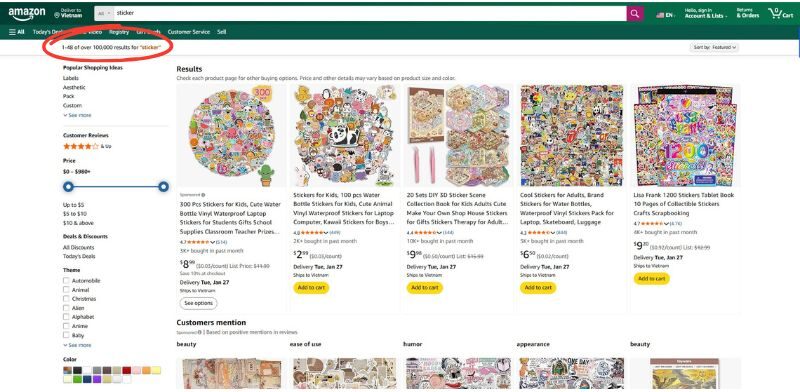
You can try searching for “sticker” on the Amazon, it already returns over 100,000 results, showing both high competition and strong demand.
One of the biggest advantages is the high profit margin. Production costs are relatively low, especially when printing in bulk or using efficient fulfillment models, margins can reach up to 80%. This makes stickers an attractive option for sellers who want strong returns from small, lightweight products.
Another key benefit is the low startup investment. You are able to launch a sticker business with under $100, especially when using print-on-demand services. This model allows sellers to offer multiple designs without holding inventory, reducing financial risk while still expanding product variety.
With low startup costs, scalable fulfillment options, strong global demand, and attractive profit margins, selling stickers on Amazon is completely highly profitable when approached with the right strategy. The more you focus on unique, niche-specific, or customizable sticker designs, the more you’re able to stand out from competitors, build stronger customer appeal, and capture the most profitable segments of the market.
How much does it cost to sell stickers on Amazon?
The cost of starting a sticker business on Amazon varies based on how you produce your stickers and the tools you use. Stickers themselves are relatively affordable; however, the equipment needed for in-house printing can quickly increase your initial investment.
If you choose to produce stickers on your own, you’ll need to invest in printing and cutting equipment, which can cost several thousand dollars in some cases. Here’s an estimated cost breakdown for getting started:
-
Inkjet printer: $100–$300
-
Cutting machine: $150–$400
-
Specialty sticker paper: $20–$50 per pack
-
Print-on-demand production: around $0.25–$1 per sticker
-
Optional design or platform tools: $0–$30/month
-
Amazon Professional Selling Plan: $39.99/month
-
Optional marketing or social promotion: cost varies by campaign
Depending on your setup, your total startup budget may range from $300 to $750 or more.
For most new sellers, a more budget-friendly path is to use print-on-demand services. With POD, the provider prints and fulfills each order for you, eliminating the need to manage inventory, production, or storage.
How to sell stickers on Amazon with POD
Step 1: Pick a niche and analyze the competition
Building a profitable sticker business starts with choosing the right niche. It needs to be specific enough to attract a clear audience, but broad enough to sustain demand. Your niche decision should be guided by data, not guess.
In addition, market research plays a crucial role here. It helps you understand what customers are buying, which themes are trending, and where gaps in the market still exist.
Here’s a practical checklist to follow:
-
Identify trends — Use tools like Google Trends and social platforms to spot rising sticker themes and buyer interests.
-
Study competitors — Review top-selling sticker listings on Amazon, Etsy, and eBay to see what works — and where opportunities remain underserved.
-
Define your target audience — Use reviews, comments, and social insights to learn who your customers are and why they buy.
-
Create buyer personas — Turn your research into audience profiles so your designs align with real customer preferences and lifestyles.
Success in the sticker market often comes from narrowing your focus. The clearer your niche, the easier it is to design products that resonate, convert, and build long-term customer loyalty.
Step 2: Choose your sticker product type
Once your niche is defined, the next step is deciding which types of stickers to sell. Different sticker materials and cuts serve different purposes and customer needs.
Sticker material types
-
Paper stickers — Budget-friendly and versatile, ideal for personal items like notebooks, laptops, scrapbooks, and planners.
-
Holographic stickers — Reflective and eye-catching, great for decorative and aesthetic designs.
-
Vinyl stickers — Durable and weather-resistant, commonly used for outdoor applications such as car decals and bumper stickers.
-
Transparent stickers — Subtle and minimal, perfect for glass, jars, windows, and surfaces where the background should remain visible.

Sticker cutting styles
- Die-cut stickers are trimmed through both the vinyl and backing, creating a clean outline around the design. They’re popular for laptops, phones, and accessories, and are cost-efficient for custom shapes.
- Kiss-cut stickers are cut only through the vinyl layer, leaving the backing intact. This makes them easier to peel and great for branding, logo stickers, and delicate designs.
- Sticker sheets group multiple designs onto one sheet, making them ideal for planners, journaling sets, labels, or themed bundles.
- Bumper stickers are designed for outdoor use, bumper stickers are UV-resistant, waterproof, and commonly used to display messages, affiliations, or personality.
- Roll stickers are printed in bulk quantities (typically 250+), making them suitable for product labels, packaging, corporate branding, and event use.
>> Read more: How To Make Print On Demand Bumper Stickers
Step 3: Design your stickers
Once you’ve chosen the types of stickers you want to sell, the next step is to create eye-catching designs that will attract buyers. With print-on-demand (POD), your focus is just on design quality and market fit and your POD partner will handle printing and fulfillment for you.
Design your own stickers
Creating your own artwork gives you total control over style, branding, and uniqueness to help set your products apart from competitors. Here are some tools that make sticker design easier:
-
Canva – A beginner-friendly design platform with templates and drag-and-drop features that simplify sticker creation.
-
Adobe Photoshop – A professional graphic editor for custom, high-quality artwork.
-
Pixlr – A web-based design tool that’s easy to use and great for quick edits or mockups.
For Amazon POD sellers, using templates and mockup generators from your POD provider helps you quickly preview how your designs will appear on real sticker products, refine placement and sizing, and create professional-looking images for your product listings. With Merchize, you can generate realistic mockups directly from your uploaded designs, making it easier to build visually appealing Amazon listings without needing advanced design skills.
Hire a designer
If you want unique, professional designs without doing the work yourself, hiring a freelance designer is a powerful option. You get custom art that matches your vision and brand identity. Popular platforms for hiring designers:
-
Upwork – a large marketplace for vetted freelancers.
-
Fiverr – quick and affordable gigs for sticker design.
-
PeoplePerHour – professional creatives for project-based work.
A custom designer can help bring your niche ideas to life and ensure your stickers stand out in a crowded Amazon marketplace.
Step 4: Decide on product fulfillment
You’ve got your niche, products, and designs — now comes the big question: How will you actually produce your stickers?
There are 2 main approaches: Print the stickers yourself and Use a Print-on-Demand (POD) fulfillment partner. However, for most Amazon POD sellers, Print-on-Demand is the smarter and more sustainable fulfillment model.
Instead of investing in equipment, managing inventory, or handling production and shipping, you can focus entirely on what actually drives sales: researching niches, creating designs, building your brand, and optimizing listings. And Merchize will take care of printing, packaging, and fulfillment.
POD also allows you to launch products with no upfront costs or stock risk, test multiple designs quickly, and scale your catalog without worrying about storage or production capacity. Although profit margins may be slightly lower than self-printing and fulfillment times depend on production batches, POD remains the most cost-efficient, low-risk, and scalable solution.
Step 5: Set up account and start selling
It’s time to set up your selling accounts and connect your store.
Create your Amazon account
Go to Amazon Seller Central and register your account. Amazon offers 2 selling plans:
-
Individual plan — no monthly fee, but limited features
-
Professional plan — $39.99/month with access to advanced tools
If you plan to sell through Merchize, you should choose the Professional plan, because Amazon requires it to enable API access for system integration.
Note that: in addition to the monthly subscription, Amazon will also deduct referral fees from each sale (up to ~20%, depending on category and price).
Connect your Merchize account to Amazon
To enable Amazon orders to be fulfilled automatically by Merchize, you’ll need to connect your Amazon Seller account with Merchize’s integration system.
-
Log in to your Merchize account at the dashboard. If you don’t have a Merchize account yet, sign up for free on Merchize and create your fulfillment store.
-
In the Merchize Dashboard, go to Integrations → Amazon.
-
Enter your Amazon Marketplace ID and Store Name. This identifies your Amazon seller store to Merchize.
-
Click Copy Amazon App URL to generate an authorization link.
-
Open the authorization link and sign in to Amazon Seller Central in a new tab.
-
Approve the Merchize app permissions when prompted to authorize access between the platforms. Merchize’s integration app is officially published on Amazon’s Marketplace Appstore and meets Amazon’s security requirements.
-
After approval, your Amazon store will show as Connected or Active in the Merchize dashboard that means orders can now sync automatically.
Once connected: New orders from your Amazon store will be synced to Merchize every few minutes. Merchize will handle printing, packing, and shipping your stickers with quality control. Shipment tracking details will be updated back to Amazon automatically, so buyers receive real-time tracking updates.
Note: At present, Merchize’s integration supports automatic order syncing and fulfillment, but it does not automatically publish product listings from Merchize to Amazon. You’ll need to create your Amazon product listings manually or use mockups generated by Merchize for your Amazon listings.
Step 6: Master Amazon SEO
The next challenge is learning how to stand out. By strategically using relevant keywords in your product titles, descriptions, and backend fields, you increase the visibility of your listings and improve the likelihood that customers will discover your products.
-
Conduct keyword research: Identify the keywords customers use to search for stickers by analyzing Amazon suggestions, competitor listings, and SEO tools.
-
Optimize product titles: Include your primary keyword naturally in the title while keeping it clear, relevant, and easy to read.
-
Write informative product descriptions: Use secondary keywords smoothly and focus on explaining the value and benefits of your stickers.
-
Use bullet points to highlight features: Summarize key details like material, size, durability, and use cases in short, benefit-focused bullets.
-
Add back-end search terms: Enter keyword variations, synonyms, and alternative phrases in the back-end fields to improve search visibility.
-
Showcase high-quality images: Use clear, realistic product photos and mockups to help buyers visualize how the stickers will look in real life.
-
Adjust pricing strategically: Monitor competitors and optimize your pricing to increase conversions and strengthen your ranking.

Step 7: Use social media to your advantage
Visual-first platforms like Instagram, Pinterest, and TikTok are especially effective because they allow you to showcase your designs, share brand aesthetics, and connect with audiences who resonate with your themes. By posting engaging visuals, short videos, design previews, packaging moments, or behind-the-scenes content, you can build personality and authenticity around your brand instead of simply displaying product images.
Moreover, responding to comments, engaging in conversations, organizing small giveaways, or collaborating with niche influencers helps strengthen community trust and expand your reach organically.
>> Read more: How to sell stickers on Etsy with inventory
Revenue-boosting tips for selling stickers on Amazon
Stickers may seem like a small-ticket product, but they offer strong income potential when priced and packaged strategically. With an average selling price of $3–$5 per sticker, profits can scale quickly, especially when you reduce production costs through bulk ordering or efficient POD fulfillment.
One of the most effective ways to grow revenue is by turning individual designs into value-driven offers such as themed bundles, multi-pack sets, sticker sheets, or mix-and-match collections. These formats encourage customers to purchase more in a single order, resulting in higher margins and better profitability per sale.
Strong visuals also play a key role in boosting conversions. Use realistic mockups and lifestyle images that demonstrate how customers can apply your stickers — on laptops, bottles, packaging, planners, or car windows. Attractive imagery helps your listing stand out and justifies a higher perceived value.
Product descriptions should go beyond basic information and focus on benefits that matter to buyers, such as durability, waterproof vinyl, UV-resistant printing, premium finishes, or unique design style. By positioning your stickers as quality creations rather than cheap novelty items, you create room for premium pricing.
Search visibility is another revenue driver. Incorporating relevant, high-intent keywords into titles and descriptions helps your listings appear in front of buyers who are actively searching for niche-specific or themed sticker sets.
To further scale income, diversify your catalog with different sizes, variations, and bundle structures, then test multiple pricing tiers to identify the best-performing combinations. Instead of competing on price, the goal is to increase perceived value and shift customers toward larger, more profitable purchases.


