Contents
Alongside Etsy, Amazon, and eBay, TikTok Shop is emerging as a powerful sales platform in the global e-commerce industry. However, not every seller can thrive on this platform, especially new sellers. They will have to overcome the TikTok Shop probation period. In today’s article, we will explore what TikTok Shop probation is and how to successfully navigate this phase. Let’s delve into the details by reading the entire article below.
What is TikTok Shop Probation?
TikTok Shop Probation is a mandatory evaluation period for all new sellers on TikTok Shop, whether you’re an individual seller or a business. Think of it as a trial phase where TikTok assesses whether your store can operate reliably before unlocking broader selling privileges.
During this period, TikTok monitors whether your shop can:
- Fulfill orders on time
- Comply with TikTok Shop policies and guidelines
- Manage shop operations effectively
- Maintain a good customer experience
If your store performs well and meets TikTok’s standards, you can move through probation and gain more room to scale.
For new sellers, especially Print-on-Demand businesses, this stage matters more than many realize. Fulfillment speed, order tracking, listing quality, and customer response times can all influence whether your shop progresses smoothly.
If your store struggles with delayed tracking updates, disorganized listings, or poor operational performance, probation may last longer and slow down growth.
In short, TikTok Shop Probation is TikTok’s way of verifying your store is ready to scale.
How long is the TikTok Shop probation period?
According to TikTok Shop’s guidelines, there is no specific time limit for the probation period. They state that shops are typically certified as meeting the standards once they consistently meet performance and compliance criteria. In short, this period ends when the platform sees consistent progress, not after a specific timeframe.
What happens when your shop is on probation?
While your store is in probation, you can still sell normally, but some growth activities may be limited while TikTok evaluates your performance.
TikTok’s probation program operates in tiers, with each level increasing your selling capacity:
- Beginner: Maximum 50 orders/day and 100 products
- Standard: Maximum 100 orders/day and 200 products
- Premium: Maximum 200 orders/day and 1,000 products
- Pro status means your shop has graduated and is no longer limited to the number of orders from the Probation Program.
The table below outlines the tasks you need to complete to hit each status:
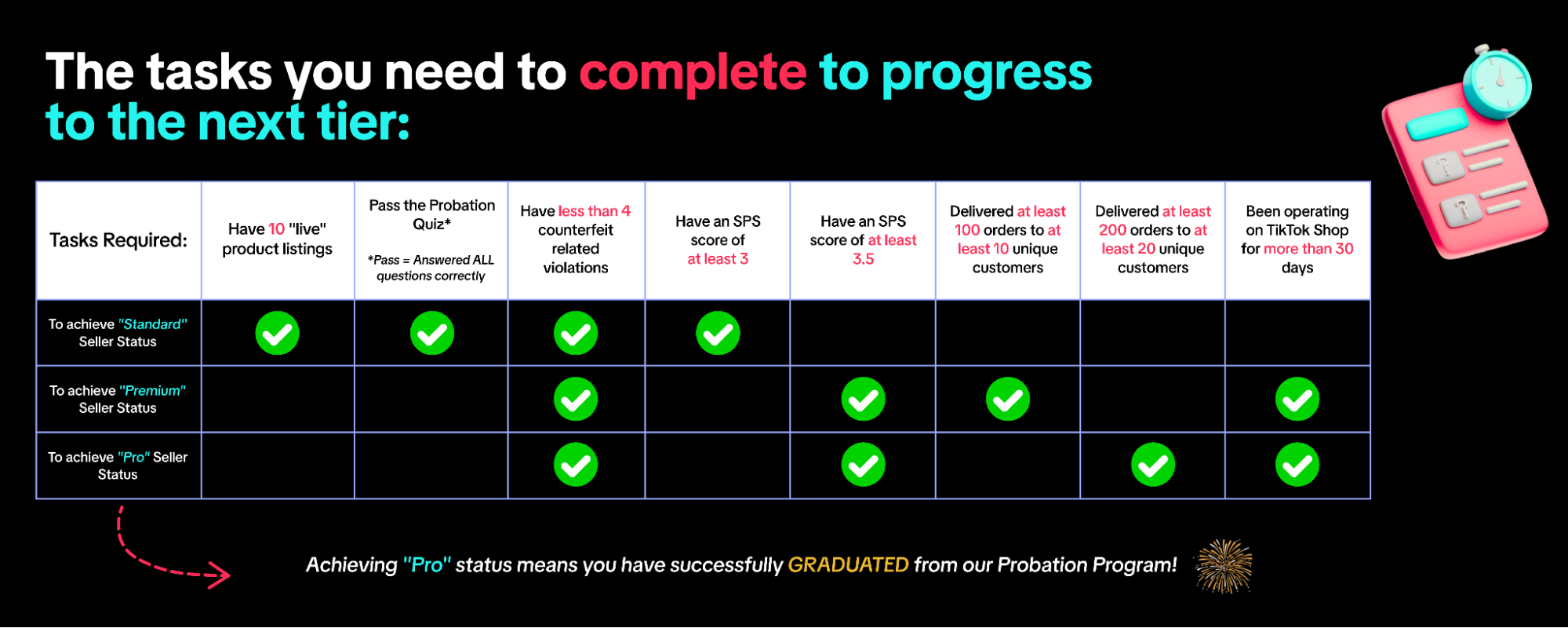
This means that in the initial stage, the shop may be limited in both the number of orders received and the number of listings that can be posted, so expanding sales or testing many products at the same time may be slower.
You should note that TikTok may adjust:
- Reducing order limits if shop performance declines
- Adjusting listing limits based on compliance and account risk
- Increasing limits when the shop performs well and moves to a higher level
Simply put, the shop is still operating normally during probation, but is in “limited mode” until it demonstrates consistent performance.
What happens after passing the Probation?
Passing probation is a major milestone because many of the biggest growth restrictions are removed. Once your shop passes probation, you may benefit from:
- No more daily order caps
- More flexibility to scale sales
- Product upload capacity up to 1,000 listings per day
- Easier expansion through affiliates and marketing
For Print-on-Demand sellers, this is often the point where it becomes much easier to scale winning products with confidence. You can check your probation status anytime in TikTok Shop Seller Center, where TikTok displays your current probation level and account progress. In short, passing probation means your shop has proven it can operate reliably, and TikTok is ready to let you grow.
Common Reasons Your TikTok Shop Stays in Probation
All new sellers, both individuals and businesses, must go through a probationary period. But some stay longer than others, and this is often not random. In many cases, TikTok is seeing signs that a store isn’t ready to be unregulated and scaled.
Here are some common reasons why TikTok Shop probation is prolonged:
Late Fulfillment or Shipping Delays
One of the most common reasons is slow order processing or shipping, and this is also a limitation for many POD sellers. TikTok Shop requires orders to be picked up and scanned by shipping carriers within two business days to meet the SLA (Service Level Agreement) for delivery times.
Additionally, sellers need to maintain key metrics such as:
- Late Dispatch Rate at 4% or lower
- Avoid going above 10%, as that may trigger warnings or penalties
- Valid Tracking Rate of 95% or higher
However, the issue isn’t just about delayed deliveries. What TikTok really monitors is whether the entire fulfillment process is running smoothly, including:
- Orders are being processed and handed off to carriers on time
- Tracking numbers are being uploaded correctly
- No missing or delayed carrier scans
- Stable production, packaging, and warehouse operations
For example, a submission marked “submitted" but without actual scan movement by the carrier is a high-risk signal that TikTok can easily detect, and this can directly impact the likelihood of passing probation.
But don’t worry, to avoid this, you can partner with Merchize to sell print-on-demand products. We have a dedicated TikTok section in our Product Catalog, filled with products that we can print and ship within TikTok Shop’s tight deadlines.
Policy Violations and Compliance Issues
Violating TikTok’s product listing policy is also a common reason for extended probation periods. TikTok does not allow sellers to create duplicate listings or sell products in prohibited categories, and this list is updated regularly.
Additionally, TikTok monitors compliance through Account Health Rating (AHR) – a scoring system from 0-1000 based on performance over the past 180 days. Low scores can negatively impact account health and slow down the probation completion process.
Pro tip: TikTok Shop policies change quite frequently, so proactively review your listings, stay updated on new guidelines, and track any adjustments you’ve made to ensure your shop is always compliant.
High Refund or Return Rate
A high refund or return rate can also prolong TikTok Shop Probation. TikTok tracks refund/return requests arising from errors by the seller or shipping partner, such as:
- Defective or damaged products
- Incorrect product delivery
- Orders not matching the description
- Delivery issues not as promised
If there are too many complaints or return requests for these reasons, TikTok may consider this a sign that the shop is not stable or reliable enough to pass probation.
You need to reducing fulfillment errors, ensuring product quality, and accurately describing listings are important ways to keep refund/return rates low and improve account health.
Customer Complaints and Low Ratings
Customer complaints and low ratings can also affect a shop’s probation period. TikTok tracks this through the Shop Performance Score (SPS) – a rating system from 0 to 5 based on customer satisfaction.
SPS is assessed based on several factors, such as:
- Negative customer reviews
- Order cancellations due to seller error
- On-time delivery rate
- Customer service quality, including message response
While SPS is not a punitive tool like Account Health Rating (AHR), a low score can still affect a shop’s credibility, visibility, and even make passing probation more difficult.
Suspicious or High-Risk Seller Activity
TikTok Shop probation can also be extended if an account shows signs of activity deemed risky or suspicious. While not always serious violations, these signs can lead TikTok to place the shop under further review before lifting probation.
Some common cases include:
- Fake or manipulated orders
- Requesting customers to pay outside the TikTok Shop platform
- Providing invalid or no tracking
- Misleading content or exaggerated product claims
- Unusual logins from suspicious or high-risk IPs
These signals can lead TikTok to consider the shop high-risk, resulting in temporary restrictions or an extension of the probation review period until the review is complete. Especially for new sellers, even unintentional errors such as incorrect tracking, unusual login activity, or excessive listing claims can negatively impact account health.
Poor Product Listing Quality or Catalog Issues
Poorly managed product listings can also keep your TikTok Shop in probation longer. Even if your products don’t violate policies, a messy or low-quality catalog can signal that your store isn’t operationally ready to scale.
Common issues include:
- Incomplete or inaccurate product titles and descriptions
- Low-quality product images or misleading visuals
- Inconsistent variants, pricing, or product information
- Uploading too many listings too quickly without proper optimization
- Duplicate or poorly organized listings that create a confusing catalog
For new sellers, especially POD sellers testing multiple designs, it can be tempting to upload aggressively. But a cluttered catalog can hurt both customer experience and TikTok’s trust in your store. Besides, poor listing quality may also contribute to lower conversion rates, more customer complaints or disputes, higher refund risk, and reduced confidence in your shop’s operational readiness.
How to Pass TikTok Shop Probation Successfully (Step-by-Step)

Passing the TikTok Shop Probation isn’t just about waiting for your probation period to end; it’s about proactively improving your performance so TikTok deems your shop eligible to scale. Below are the key steps to help you pass probation more smoothly.
Step 1: Check your probation status and account health metrics
First, regularly check your probation status in the TikTok Shop Seller Center to see what level your shop is at and what conditions you still need to meet to be upgraded.
Log in to Seller Center and check the four places:
- Homepage / Probation Program page for your current status, tier, and required tasks.
- Manage Orders for your daily order tracker and remaining capacity.
- Account Health / Shop Health for violations.
- Fulfillment Performance for tracking, dispatch, cancellations, and delivery metrics.
Remember that you don’t wait for a problem to arise before checking. Early detection of bad signs will help you address them before they affect probation.
Step 2: Fix Listing Issues and Stay Compliant
A poorly optimized listing or one that violates policies can lead to a longer probation period for your shop. Review the following:
- Remove duplicate listings
- Optimize product titles, descriptions, and images
- Ensure product information is accurate
- Check if products fall under restricted categories
- Monitor for updates from TikTok Shop policies
You should remember that don’t upload too many designs just to test volume. A clean, concise, and optimized catalog is usually much better than a massive upload.
Step 3: Improve Order Fulfillment Speed and Reliability
This is one of the key factors TikTok Shop uses to evaluate and help you pass the probation period. You need to ensure fast order processing, timely carrier handover, valid tracking, minimal late deliveries, and consistent fulfillment metrics. For a POD seller, achieving all of this requires a reliable printing partner like Merchize.
With Merchize, you can proactively better control production speed, order processing, and fulfillment quality. These are factors TikTok is particularly concerned about during the probation phase.
Some recommendations when starting a TikTok Shop with Merchize:
- Choose products that are easy to fulfill first. Starting with fewer products makes it easier to control quality and order processing time.
- Prioritize products with consistent production times. This helps reduce the risk of late deliveries and maintain better performance.
- Set realistic delivery times. Don’t overpromise. Accurate expectations often reduce complaints and refunds.
- Order samples before scaling. Checking product quality, packaging, and delivery speed beforehand is always a good step, especially for new sellers.
- Carefully check shipping and fulfillment settings. Ensure the shipping setup information on your TikTok Shop matches your actual operational process.
- Scale gradually before expanding your catalog. During probation, stable operation is often more important than uploading a large number of products.
Bottom line: With TikTok Shop probation, fulfillment isn’t just about shipping – it signals to TikTok that your shop is reliable enough to scale. And for POD sellers, starting with a stable production process from the beginning is always a big advantage.
Step 4: Reduce Refunds and Proactively Prevent Customer Complaints
TikTok evaluates not only how you handle orders, but also the customer experience. Some ways to reduce complaints and improve performance:
- Write clear product descriptions, avoiding false expectations
- Use accurate product images
- Provide complete sizing/details
- Set honest delivery times
- Respond quickly to customer issues
If errors occur, quick resolution is often better than letting disputes escalate. TikTok’s Shop Performance Score (SPS) also considers customer satisfaction with the product, fulfillment, and customer service, so these are interconnected. Realistic expectations often lead to better refund reductions than any post-sales handling tactics.
Step 5: Proactively contact TikTok Support or submit an appeal if needed.
If the probation period is unusually long or your shop is restricted by mistake, don’t just wait for the system to handle it automatically. Be proactive:
- Submit an appeal for the violation if there is evidence.
- Check Shop Health to address any outstanding warnings.
- Contact Seller Support if your shop is restricted for no apparent reason.
Sometimes, a well-written appeal can resolve the issue much faster. If TikTok requests feedback or additional information after a review, respond as soon as possible.
FAQs
1. How long does TikTok Shop probation last?
Currently, TikTok Shop does not support early termination of the probationary period for new sellers. Your probationary period for a new shop will automatically end after 30 days if you meet the criteria.
You can check your shop’s performance metrics under Seller Centre > Account Health > Shop Health.
2. What limits apply during Probation?
You may see limits on daily orders and total product listings. These guardrails help ensure consistent fulfillment and customer experience as your shop grows.
3. Can probation be removed early?
Yes, it can be. Shops typically graduate as soon as they meet performance and compliance standards consistently.
4. What happens if I fail probation?
Failing TikTok Shop probation leads to prolonged restrictions, including lower daily order limits, product listing suspensions, and potential account suspension. Severe or repeated violations can trigger permanent bans, withheld funds for up to 90 days, and account-wide, long-term penalties.
5. Will my strong performance during Probation affect my future growth?
Yes, in a positive way. Strong performance helps your shop unlock higher limits, greater visibility, and faster growth opportunities.