Contents
Are you feeling exhausted from constantly racing against social media algorithms? It is frustrating when content you spent all day creating gets buried after just a few hours. It is time for a more sustainable path, where the value you create today can still bring results months or even years from now.
Without needing to show your face on camera, and without facing the fierce battle of Google SEO, this Pinterest affiliate marketing guide will open up a completely new marketing mindset for you. Let’s discover the roadmap to build passive traffic and optimize your commissions in the safest way.
Why does Pinterest work for affiliate marketing?
Basically, affiliate marketing is a model where you earn a commission when you help drive online sales for another brand through a special tracking link. Simply put, you place a brand’s product link in your content; when customers see it, click on it, and complete a purchase, you get paid.
However, out of many platforms, why is Pinterest the most ideal ‘promised land’ to start this model?
1. User behavior: Search to shop
While people scroll through Facebook or TikTok mainly for entertainment, Pinterest works like a visual search engine. The vast majority of users actively visit Pinterest to look for solutions, ideas, and specific products before buying. They are already very close to the buying step, which means the conversion rate from views to orders is much higher.
Read more: How to Make Money on Pinterest in 2026: 10 Methods That Actually Work
2. A potential market that is still open
Despite having over 631 million monthly active users, the number of creators truly focusing on Affiliate Marketing here is very small. The demand is huge, but the supply of quality content is still seriously lacking. This is the exact gap you should step into.

3. Content lifespan: The power of passive traffic
This is the biggest difference that helps Pinterest beat traditional social media platforms. The average lifespan of a post on X (Twitter) is only about 15 minutes, Facebook is 6 hours, and Instagram is 48 hours. Meanwhile, a well-optimized image (Pin) on Pinterest can continue to get steady interaction after 1 year, or even a few years. You do not need to post new content every day.
4. SEO Leverage: An alternative solution and ‘Traffic trap’ from Google
As Google’s algorithms change constantly, making Website SEO more and more difficult, Pinterest can help you take over Google’s own spots. When you do good SEO on Pinterest, your boards or Pins are often ranked number 1 by Google for niche keywords: Customers search on Google -> Click on Pinterest -> Reach your post.
Pinterest affiliate marketing guide: 6 simple steps
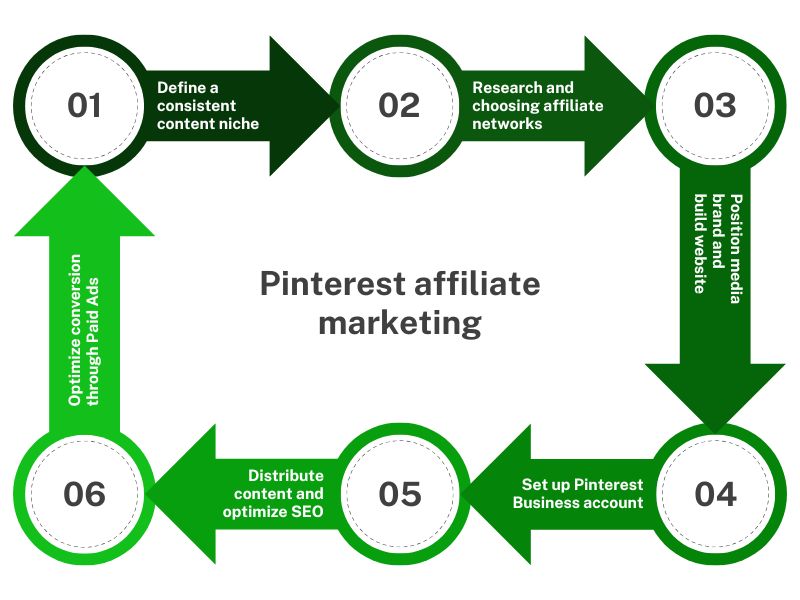
Step 1: Define a consistent content niche
The biggest mistake of beginners is turning their Pinterest account into a messy ‘market’ – posting about food today, sharing hair tips tomorrow, and talking about cars the day after. In reality, Pinterest’s algorithm works by recognizing topics to distribute them to the right group of users. Therefore, your account must have a consistent theme to build trust and keep followers.
In addition, you need to pay special attention to the demographics of this platform. More than 3 out of every 4 users identify as female, and this exact feature turns female-focused niches into gold mines with extremely high conversion rates. For example, in the health niche, you can go deeper into a smaller niche like supplements for women.
Step 2: Market research and choosing affiliate networks
In nature, Pinterest is only a visual search engine, not a platform that directly sells products or pays commissions. To make money, you play the role of a bridge: you get tracking links from reputable affiliate networks and bring them to Pinterest to attract customers.
The specific process is as follows:
-
Phase 1: Understand the market
Do not test products based on your feelings; let Pinterest’s own data guide you. You just need to type your main niche keyword into the search bar, then observe and analyze the images that are getting the most interaction from the community.
Click on the links that competitors are putting on their posts to study their conversion funnels: see if they are sending customers directly to an e-commerce platform or through a personal blog. This is the fastest way for you to learn and copy models that are already successful.
- Phase 2: Choose a launchpad from top Affiliate Networks
Depending on the nature of the products in your chosen niche, you should sign up for an account on large and reputable global networks like Amazon Associates (strong in physical products), Impact.com, or PartnerStack (strong in digital products and software). An important note: Pinterest’s scanning system is extremely sensitive to direct affiliate link spamming (especially raw links from Amazon) on posts.
The smartest and most sustainable strategy is to use a ‘Bridge Page’. This means you will take the link from the affiliate network -> fit them naturally into valuable articles on your own Website/Blog -> then use Pinterest to drive traffic to that Website. This method not only protects your account from spam cleanups but also lays the foundation for you to build a real media brand in the eyes of your readers.
Step 3: Position your media brand and build a Website
To go a long way with affiliate marketing, you need a real media brand, similar to how Business Insider or Morning Brew operates. Having a brand identity helps you shape your style and serves as a ‘passport’ in the Affiliate world.
The reason is that major affiliate networks have very strict screening processes for partners. A website with a clear structure and quality content will prove your media capability, making it easier for your affiliate application to be approved. More importantly, a website acts as a safe filter, helping you direct traffic from Pinterest to a space you own before leading them to the shopping page.
Step 4: Set up and optimize a Pinterest Business account
If your goal is for commercial purposes, using a Business Account is a must to ensure the legal status of your trading activities on the platform.
In terms of public appearance, personal accounts and business accounts look exactly the same. However, the Business version (which is a completely free upgrade) will unlock advanced tools that an affiliate marketer cannot live without:
-
Deep analytics system: Helps you clearly break down metrics like impressions, click rates, saving behaviors, and understand your audience profile.
-
Special Pin formats: Automatically sync data from your website (such as titles, descriptions, prices) directly to your posts, which increases trust and click rates.
-
Ad manager: Opens up opportunities to actively reach customers through paid campaigns when you have a budget.
The process of setting up and optimizing a professional profile is very simple. You can create a new one using a Google account or convert directly from an existing personal account. During the setup, the system will ask you to choose your main business focus. The best choice for this model is ‘Showcase your brand’. This choice will take you straight to the profile settings page to complete your account.
To optimize organic conversions, sync your entire brand identity from your website to Pinterest. Use a sharp logo, set a consistent brand name, and write a short bio that contains your niche keywords while still highlighting the value you bring to viewers. Finally, do not forget to add the link back to your Website or resource page in your profile information.
Step 5: Distribute content and optimize Pinterest SEO
The main format of a Pin is usually a visual image (or a short video), designed with a single goal: to direct traffic to a strategic destination that you choose. To turn views into quality traffic for affiliate marketing, you need to do these 3 things.
In the first week of starting, you should post about 20 – 30 different Pins around your target product group to create a baseline data set for the algorithm to recognize. Absolutely do not post hundreds of Pins a day, because this will trigger Pinterest’s automatic spam scanning mechanism, causing your account to be flagged as a bot and seriously reducing your engagement.
Second, because Pinterest is a visual search engine, the design of the Pin decides 80% of the click rate. You should use Canva to design according to Pinterest’s standard vertical format (2:3 ratio, usually 1000x1500px). Focus on eye-catching images, clean layouts, and add large text titles to grab attention.
Finally, Pinterest’s algorithm reads and understands content based on text. You need to build titles and descriptions that include high-search keywords naturally. Avoid stuffing keywords without making sense. At the end of each description, always include a clear CTA like ‘Tap to learn more’ to encourage readers to click.
Step 6: Optimize the conversion funnel through Paid Ads
It is true that affiliate marketing on Pinterest has a huge advantage with free traffic, but actively investing in targeted ads will bring even more benefits. If you already have a few Pins with good organic conversion rates, running ads will help bring that great content to a much larger group of potential customers.
Pinterest’s ad system is considered user-friendly and easy to use:
-
Quick ad creation feature: Perfect for beginners or those who want to save time. Right on the interface of your target Pin, you just need to click the ‘Promote’ button, check the destination link (website or product page), set a daily budget in USD (the default minimum is about 3 USD/day), and let the system automatically target the most suitable audience.
-
Advanced Campaign Manager (Campaign Creation): Here, you can set specific campaign goals (such as brand awareness or website clicks), create separate ad groups, set the running time, and customize the exact demographics and interests of your target audience.
Learn more about this in the guide: Why you should use Pinterest Ads for your print on demand business in 2025?
What to know before starting affiliate marketing on Pinterest
1. You should only own and run a single account. Creating multiple duplicate accounts to cross-post content or intentionally trick the display algorithm is a violation of the spam policy. The only exception to this rule is if you truly own different brands in completely separate fields.
2. All images, videos, and texts you post on your account must be original content designed by you or used with proper copyright. Re-posting other people’s content from Pinterest or other social media platforms will be quickly caught by the algorithm, leading to your account losing engagement or being permanently banned.
3. When doing affiliate marketing, you must clearly disclose the commercial nature of your content. Always include clear tags or notes like ‘sponsored’ or ‘affiliate link’ in your post so users know that you will earn a commission if they make a purchase through that link.
4. Prohibited activities include: creating multiple fake accounts to pin posts or fake engagement for your main account, stuffing keywords without making sense, or spamming a large number of posts with links in a short time. Instead of looking for ‘loopholes,’ focusing on image SEO and optimizing user experience is the key to helping your Pins stay active and rank sustainably.
Income mechanism and growth roadmap on Pinterest
1. Projected income model by account stages
Note: The figures below are examples based on industry averages to help you set strategic goals; they are not fixed revenue guarantees.
| Performance metrics | Startup phase (0 – 6 months) | Acceleration phase (6 – 18 months) | Maturity phase (Over 18 months) |
| Monthly impressions | 50,000 | 500,000 | 2,000,000 |
| Click-through rate to landing page | 0.5% | 1.0% | 1.5% |
| Total clicks (Traffic) | 250 | 5,000 | 30,000 |
| Conversion rate to orders | 1.0% | 2.0% | 2.5% |
| Total orders | 2.5 orders | 100 orders | 750 orders |
| Average commission / order | $15 | $20 | $25 |
| Potential income / month | $37.50 | $2,000 | $18,750 |
2. Timeline roadmap
-
Months 1 – 3 (Testing phase): This is when your traffic is at its lowest. Pinterest’s algorithm needs time to “read" your account, evaluate your image quality, and check the relevance of your keywords. Your main goal right now is to practice your Pin design skills on Canva and optimize your SEO.
-
Months 4 – 8 (Growth phase): Traffic starts to grow quickly thanks to the “rooting" effect. Old Pins you posted months ago begin to get recommended and rank higher on search results. Your first steady commissions will appear in this phase.
-
Months 9 – 18 (Booming phase): The accumulation effect officially kicks in. At this point, both your old Pins (which are ranking high) and new Pins work together to drive traffic, creating a double stream of traffic to your website.
-
From 18 months onwards (Sustainable phase): Your account becomes an Authority Account in your niche. You own a huge library of accumulated Pins that run automatically. Your work now shifts to optimizing the conversion funnel on your website to maximize profit margins.
Keep in mind:Taking 60 to 90 days to see your first significant commissions matches the unique shopping behavior on Pinterest. Users have a habit of “pinning" ideas to save, think about, and plan. The actual buying decision usually happens weeks or even months after they first see your Pin.
Best tools for Pinterest affiliate marketing
1. Pinterest Analytics
This is an in-depth data analysis tool built into your Business account. It allows you to track all important metrics like impressions, saves, click-through rate (CTR), and the performance of links leading back to your website.
2. Pinterest Trends
A free tool from the platform that helps you catch the actual search trends of users at any time. From there, you can plan your content to match what the market wants, optimize your organic reach, and increase sales.
3. Canva
An essential visual graphic design platform to create eye-catching vertical Pins (2:3 ratio – 1000x1500px). It helps you easily add text titles to grab attention and keep your brand identity consistent without needing professional skills.
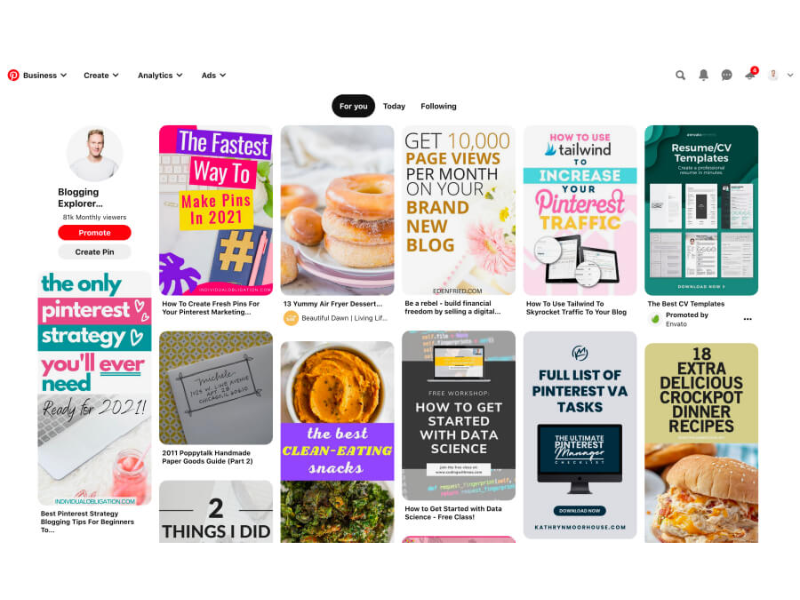
4. Tailwind
A leading automation app specialized for Pinterest. It helps you schedule posts in bulk weeks in advance to keep a consistent posting schedule, while providing hashtag optimization tools and suggesting the best times to post to expand your audience.
5. PinGroupie
A unique tool that helps you quickly find and join high-quality Group Boards in your niche. It also supports analyzing trending keywords and finding top creators on the platform.
6. CapCut
A great and cost-effective video editor that helps you follow the Video Pins (Idea Pins) trend. It offers many effects, smooth editing tools, and built-in AI features to create convincing e-commerce product videos.
7. ReferralCandy
If you want to build your own affiliate or referral program for your brand, this tool automates the process of creating tracking links, landing pages, and invitation emails to get customers to share your products on Pinterest.
8. Termly
A legal solution that helps you create a proper Privacy Policy page in just a few minutes. It ensures your affiliate account fully complies with strict international laws like GDPR or CCPA when collecting user data.
9. Social Champ
A centralized social media management platform that allows you to plan and post content directly to Pinterest boards, optimize hashtags, and analyze campaign performance metrics in a single interface.
10. Nuelink
A powerful automation tool for content syncing. It allows you to automatically cross-share Pins across multiple boards or reuse content from Pinterest for other platforms like Instagram and Facebook to maximize traffic from existing resources.
A few final pieces of advice
To maximize your organic reach and protect your conversion funnel, apply these advanced optimization rules before hitting the publish button on any Pin:
1. Make the most of Alt Text
Alt Text not only helps the algorithm understand your images accurately but also helps you optimize relevant keywords. Notably, Google Images prioritizes indexing pictures from Pinterest. Filling in a short Alt Text that contains your target keywords will give your Pin a chance to show up right on Google search results, expanding your audience beyond the Pinterest platform.
2. Use strategic hashtags instead of spamming
Although Pinterest works mainly based on SEO keywords, adding hashtags correctly still speeds up content distribution. The ideal number for each Pin is 2 to 8 hashtags placed at the bottom of the description. You should use this formula: 1 exclusive brand hashtag combined with specific hashtags about the topic of that post.
3. Organize content with a system of Boards
Boards help you sort your Pins into clear content categories, similar to subcategories on a website. This makes it easy for readers to follow your content and helps the algorithm understand the main theme of your account. Real statistic: Top creators on Pinterest own an average of about 56 boards. Break down your broad niche into smaller sub-topics to reach the specific interests of your customers more deeply.
FAQs
1. How can I get approved for Affiliate programs if I have a new account and no website?
Affiliate Managers always want to filter out fake accounts, so actively send them a direct, professional email. Tell them that you are a content creator running a strategy to drive highly potential niche traffic on Pinterest and want to cooperate. This action proves your seriousness, gets your application reviewed manually, and highly increases your approval rate.
2. How should I handle changes in Pinterest’s algorithm or policies?
Diversify your marketing strategy and always actively update the latest community standards directly from the platform. Instead of trying to find loopholes, focus your resources on creating high-quality original images that bring real value to viewers.
3. What is the best way to balance promotional and non-promotional content on the platform?
To keep engagement and build long-term trust with your readers, you should strictly follow the 80/20 golden ratio rule when posting content: 80% of your Pins must focus completely on sharing useful solutions, tips, or pure inspiration, while the remaining 20% can be used for commercial posts containing affiliate links to optimize your commissions.
4. How do I track the engagement of my pins on Pinterest?
Use the deep analytics dashboard built into your business account. This toolset gives you a complete view of everything from impressions and saves to click-through rates (CTR). This helps you know exactly which Pin is driving the best traffic so you can optimize your funnel and grow your income.
Pinterest is not just an entertainment social media network; it is actually a huge traffic anchor that can help you build a sustainable passive income source in the long run. Hopefully, this Pinterest affiliate marketing guide has given you a clear, practical roadmap. Wish you all the best in earning your first steady commissions from this highly potential visual platform soon!