
How To Update Tax Information for EU Orders (IOSS / VOEC / UK Tax)
To ensure smooth customs clearance for international orders, sellers must provide the appropriate tax identification number based on the destination market. Merchize currently supports the following tax information types:
- IOSS: For orders shipped to the European Union (EU)
- VOEC: For orders shipped to Norway
- UK Tax: For orders shipped to the United Kingdom
Important:
- Tax Information settings are only available for stores with Auto Fulfillment by Merchize enabled.
- VOEC information is required for orders shipping to Norway. Orders shipping to Norway are required to have VOEC information. The system will show an error and block any order with a Norway shipping address that is missing VOEC information.
Sellers can configure tax information at either of the following levels:
- Store level – applies automatically to all eligible orders within the store.
- Order level – applies to individual orders, including orders imported from external platforms.
Configure Tax Information for an Entire Store
Tax information configured at the store level will be applied automatically to all orders shipped to the EU, Norway, or the United Kingdom.
1. Navigate to Home → Settings → Fulfillment.
2. Locate the Tax Information section.
3. Enter the appropriate tax number in the corresponding fields:
-
- IOSS
- VOEC
- UK Tax
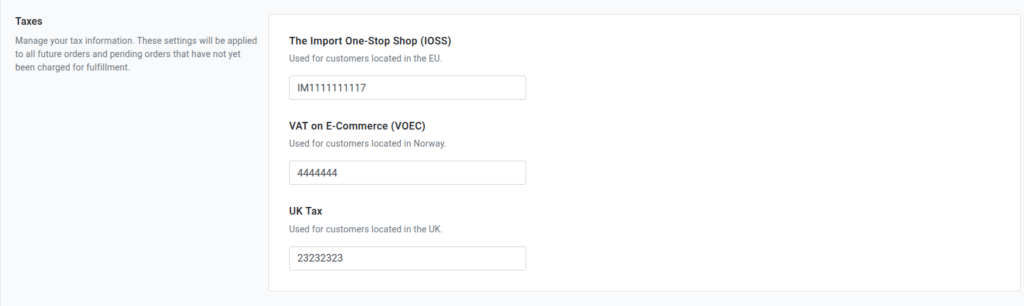
4. Ensure the entered values meet the following requirements:
IOSS:
- Must begin with the prefix IM
- Length: 12 characters
- Must not contain spaces or special characters
- Example: IM7807000742
VOEC Requirements
- Maximum length: 7 numeric characters
- Must not contain spaces or special characters
- Format example: 2021137
UK Tax Requirements: No character limit
5. Click Save to apply the changes.
Update Tax Information for Individual Orders
This option applies to orders that are:
- Created manually
- Imported via CSV
- Imported via API
- Synced from external platforms
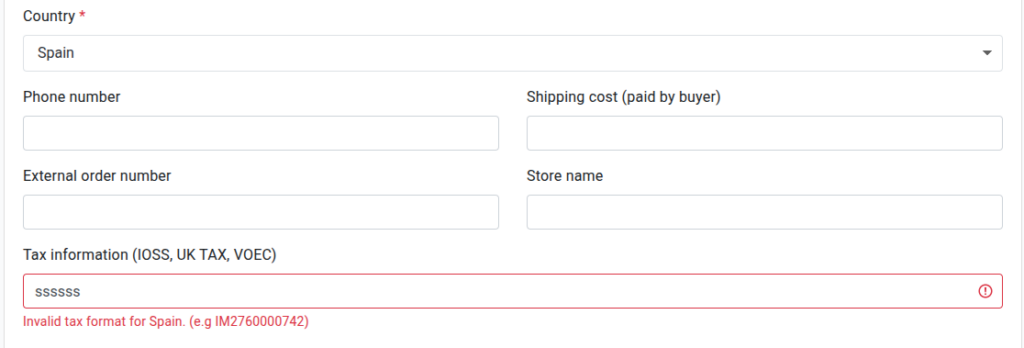
A) Update During Manual Order Creation
When creating an order manually, enter the tax information in the Tax Information section.
The system will automatically validate the entered tax number based on the order’s destination address.
B) Update from the Order Details Page
1. Navigate to Home → Orders.
2. Open the order that requires an update.
3. Locate the Tax Information section (IOSS, VOEC, or UK Tax) in the right-hand sidebar.
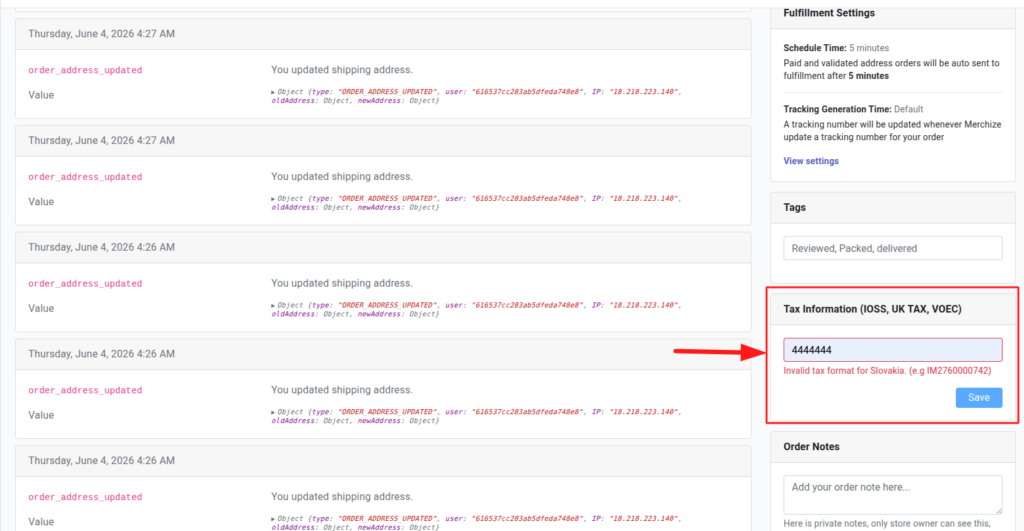
4. Enter the appropriate tax number.
5. Save the changes.
C) Update via CSV Import or API
When importing orders through CSV files or API, sellers can include tax information directly in the import data.
Requirements
- Tax information must be included in the imported order data.
- Tax values must follow the required format for the destination country.
You can read more about pushing orders via CSV here. For API orders, check this document.
Important Notes
- If the tax information is entered in the wrong format for the order’s country, the system will show the error “Invalid tax format for [country]".
- If no IOSS code is provided, orders shipping to the EU may be charged additional VAT at the border, and the recipient will have to pay the extra fee.
- Tax information can only be edited before the order is sent to production. Once an order has been sent to the production stage, the information is pushed over and can no longer be changed.