
How To Set Up Shipping Profile for Merchize Shopify App
This guide covers the shipping profile feature in the Merchize app for Shopify: how the app sets shipping rates for products you publish from Merchize to your Shopify store, what the Use Merchize shipping profile setting does, and how to adjust it.
The Merchize app can now manage a dedicated shipping profile for the products you publish from Merchize, so they don’t show as Sold out. To do this, the app asks for a few additional Shopify permissions — see Permissions the app requests.
Note: Check your rates after your first product is published
Merchize does not send a separate notice when it creates its shipping profile. If your General profile has no flat rate to copy, some or all of your Merchize products will ship free until you change the rate in Shopify Admin.
How it works
Products fulfilled by Merchize ship from a Merchize location in your Shopify store. Shopify only lets customers buy a product if that location has a shipping rate in the product’s shipping profile — otherwise the product shows as Sold out, even when it is in stock.
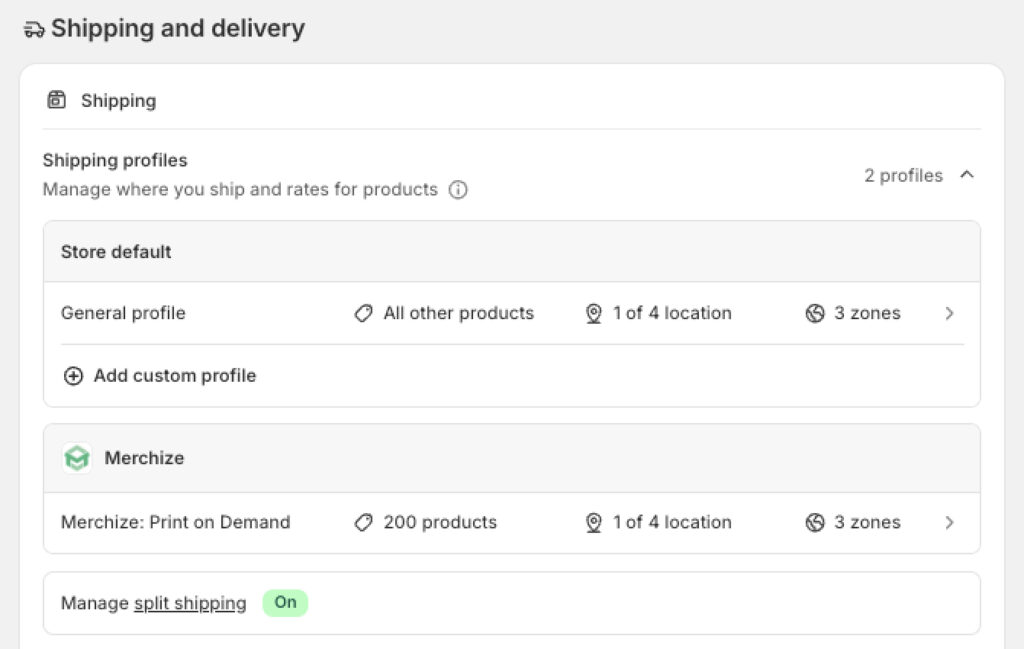
Merchize handles this by placing the products you publish from Merchize in a separate shipping profile named Merchize. Your General profile is never modified. Keeping the profiles separate also keeps shipping charges accurate: when a cart mixes Merchize products with your own, Shopify adds both profiles’ rates together, so both shipments are covered.
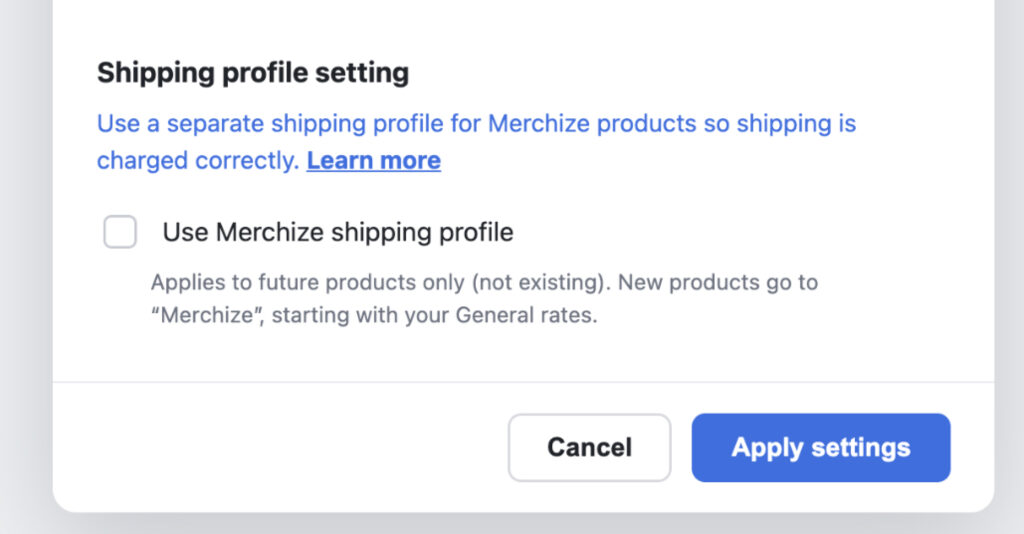
Whether the setting starts on or off
| Your store | Default |
| Installed the app after this feature was released — including reinstalling it | On. Products you publish go to the Merchize profile and are ready to sell. |
| Had the app installed before this feature was released | Off. Nothing in your store changes. Turn it on whenever you want new products to use the Merchize profile. |
The setting applies to future products only. Products already published before you turned it on are never moved.
Permissions the app requests
This feature needs the Merchize app to have the following access to your Shopify store:
| Access | Why the app needs it |
|---|---|
| Shipping | To create the Merchize shipping profile, copy its starting zones and rates from your General profile, and add products to it. |
| Markets | To find your store’s primary market country, used only when your General profile has no shipping zones. |
| Locations | To keep the Merchize profile connected to the Merchize location, for example after you reinstall the app. |
If you installed the app after this update, these permissions are included when you install, and there is nothing to do.
If you installed the app before this update, Shopify asks you to approve the new permissions the next time you open the Merchize app in Shopify Admin. Until you approve them, the Use Merchize shipping profile setting stays locked, and the rest of the app keeps working as before.
What happens when you publish a product
With the setting on, each product you publish from Merchize to Shopify is handled as follows:
| Situation | What Merchize does |
| The product is already in another shipping profile — one you created, or one from another app | Leaves it where it is. |
The Merchize profile doesn’t exist yet |
Creates it, sets its starting zones and rates (see below), and adds the product. |
The Merchize profile already exists |
Adds the product. Your current rates are not changed. |
How the starting rates are set
When the Merchize profile is created, it uses the same shipping zones as your General profile, so Merchize products ship to the same places as the rest of your catalog. Rates are then set zone by zone:
| Zone in your General profile | Starting rate in the Merchize profile |
| Has a flat rate | The same flat rate is copied. |
| Uses only carrier-calculated rates | Free ($0). Shopify cannot calculate carrier rates for app locations such as Merchize. |
| Has no rate | Free ($0). |
If your General profile has no shipping zones at all, Merchize creates a single zone for your store’s primary market country (set in Shopify Markets), with a free ($0) rate.
Starting rates are copied once. After that, the rates are yours — Merchize never changes them.
Changing your rates
- In Shopify Admin, go to Settings → Shipping and delivery.
- Open the
Merchizeprofile. - Edit the rate for each zone, then select Save. Enter $0.00 for free shipping.
Products published before you turned the setting on
These stay where they are — usually in your General profile. If they show as Sold out, that profile has no shipping rate for the Merchize location. You can either add a rate for the Merchize location in your General profile, or move the products into the Merchize profile:
- In Shopify Admin, go to Settings → Shipping and delivery and open the
Merchizeprofile. - In the products section, add the products you want to move, then select Save.
Moved products take the Merchize profile’s rates, so their shipping price may change.
Turning the setting off
When you clear the checkbox, Merchize warns that your products may become unavailable for sale. New products then stay in your General profile and show as Sold out unless that profile has a rate for the Merchize location. Products already in the Merchize profile stay there.
If the Merchize profile is deleted
Merchize does not re-create the profile automatically. Shopify moves its products back to your General profile, where they may show as Sold out.
To restore it, select Re-create profile in Settings and confirm. The new profile starts from your General profile’s current zones and rates, following the same rules as above. Rates you customized in the deleted profile cannot be restored.
If you reinstall the app
The setting starts on. If your Merchize profile still exists, Merchize reuses it and reconnects it to the Merchize location — it doesn’t create a second profile, and your rates stay as they are.
Shipping charges on orders
The shipping rate comes from the profile a product belongs to. When a cart contains products from more than one profile, Shopify works out a rate for each profile and adds them together, showing the customer one combined shipping charge. With flat rates, each profile’s rate is charged once per order, however many items from that profile are in the cart. See Shopify’s article on combined shipping rates.
A free shipping threshold set in your General profile may not apply when a cart is split across profiles, because each part can fall below the threshold on its own.
Customers can only check out if their country is in a zone with a rate in the product’s profile.
Frequently asked questions
Why are my Merchize products shipping free?
Your General profile had no flat rate for some or all zones when the Merchize profile was created — for example because it uses carrier-calculated rates. Set the rates you want in the Merchize profile.
Does Merchize change my General profile?
No. Merchize only creates and manages its own profile.
Will Merchize move products I have already published or organized myself?
No. Only products published after the setting is on are added, and products already in another profile are left alone.
I turned the setting on, but my older products still show as Sold out. Why?
The setting only applies to products published from that point on. See “Products published before you turned the setting on" above.
Why are my Merchize products showing as Sold out?
The Merchize location has no shipping rate in the profile the product belongs to. Check that profile in Shopify Admin.
To learn more about how shipping profiles work in Shopify, see Shopify Help Center: Shipping profiles.
Shopify is changing how shipping is set up
Shopify is gradually moving stores from shipping profiles to shipping options by market, where shipping rates are set up for each market in Markets instead of in shipping profiles. Stores are upgraded over time; until yours is, shipping profiles keep working as usual.
To check which system your store uses, go to Settings → Shipping and delivery in Shopify Admin. If you see shipping profiles, your store uses the current system described in this guide. If you see a Shipping options section organized by market, your store has been upgraded. We’ll update this guide as Merchize adds support for shipping options by market. Learn more in Shopify’s article Upgrading from shipping profiles to shipping options by market.
To learn more about how shipping profiles work in Shopify, see Shopify Help Center: Shipping profiles.